Daily Horoscope Launcher
- 4.5
- Rating
- 1.00M
- Installs
- Free
- Price
 Analysis by App-foxy
I spent time with Daily Horoscope Launcher as a lifestyle app rather than treating it like a simple horoscope page. Its main idea is to bring zodiac predictions closer to the place where many people begin using their phone: the home screen. That makes it feel more like a small daily habit than a destination I need to remember to open.
My first impression was that the app is aimed at people who want quick astrology content without building a complicated chart or learning a new system. It is free, suitable for Everyone, and developed by AtomApplications. The app has reached over one million installs and holds a 4.5 average from around eleven thousand ratings, so it is clearly being used as a lightweight everyday tool rather than a niche astrology experiment.
How the launcher fits into a daily routine
The most useful way to think about this app is as a shortcut between the Android home screen and a daily horoscope. Instead of searching for a website, opening a browser tab, or scrolling through a large astrology service, I can use the launcher concept to keep the subject visible and easy to revisit. That is a small change, but it matters if I enjoy checking a prediction with my morning coffee or during a quiet break.
You May Also Like

 Blood Strike: 2.5 Anniversary
Blood Strike’s Loadouts Turn Every Drop Into a Tactical Gamble
A close look at Blood Strike’s custom loadouts: how fast access to signature weapons reshapes its battle royale rhythm, rewards preparation, and narrows the gap between fights.

 Pandora - Music & Podcasts
Pandora’s Music Is Easy to Start, but Harder to Recover
Pandora’s strength is its low-effort path from a seed to a station. Its weak spot is how much confidence it asks you to place in connection, setup, and quiet recovery.

 8 Ball Pool
 Is Built on Rivalries, Rematches, and Routine
A close look at the rivalries, rematches, shared routines, and unanswered safety questions that turn a quick pool match into a persistent mobile community.

 Samsung Music
’s Quiet Strength Is Playing What You Already Own
Its reach comes less from spectacle than from dependable access to a personal library. That simplicity is both the app’s strongest retention engine and its ceiling.

 AccuWeather: Weather Radar
AccuWeather Review: A Quick, Clear Forecast for Everyday Decisions
For everyday plans, the best forecast is the one you can understand quickly. AccuWeather makes rain timing, radar, and local conditions easy to act on, with a few trade-offs.

 Hill Climb Racing
Why Hill Climb Racing Still Turns Crashes Into One More Run
A tiny car, a bumpy hill and one more upgrade: Hill Climb Racing keeps resurfacing because its simple chaos makes every near-miss feel personal.
More From Our News Desk
View All News


The app was released on February 8, 2024, and its current version is 1.32.1. It requires Android 10 or later, which places it within reach of many relatively recent phones while excluding older devices. That requirement is worth checking before installing, especially if the phone belongs to a family member who keeps an older handset for reliability or accessibility reasons.
I also like that the experience does not present itself as a demanding productivity system. There is no need to maintain a long profile, organize tasks, or learn a dense interface before getting value from it. The central appeal is immediacy: choose or view a zodiac sign, read the daily material, and return to the rest of the phone.
Readability and navigation in ordinary use
For a horoscope app, readability is not a minor detail. The content is usually consumed quickly, often in imperfect conditions, and the reader wants to understand the main point without navigating through several layers. Daily Horoscope Launcher benefits from that focused purpose. Its store summary describes zodiac and horoscope access through a launcher, while the short description reduces the promise to “Daily Horoscope.” In practice, that sets a clear expectation: the app should help me reach the daily reading rather than overwhelm me with unrelated tools.
I found the launcher approach particularly helpful for users who have difficulty remembering where an app is located or who prefer a predictable starting point. A visible entry point can reduce the number of actions between intention and content. That does not automatically make every screen accessible, but it can make the overall routine less mentally demanding than opening a browser and searching for a familiar horoscope source each day.
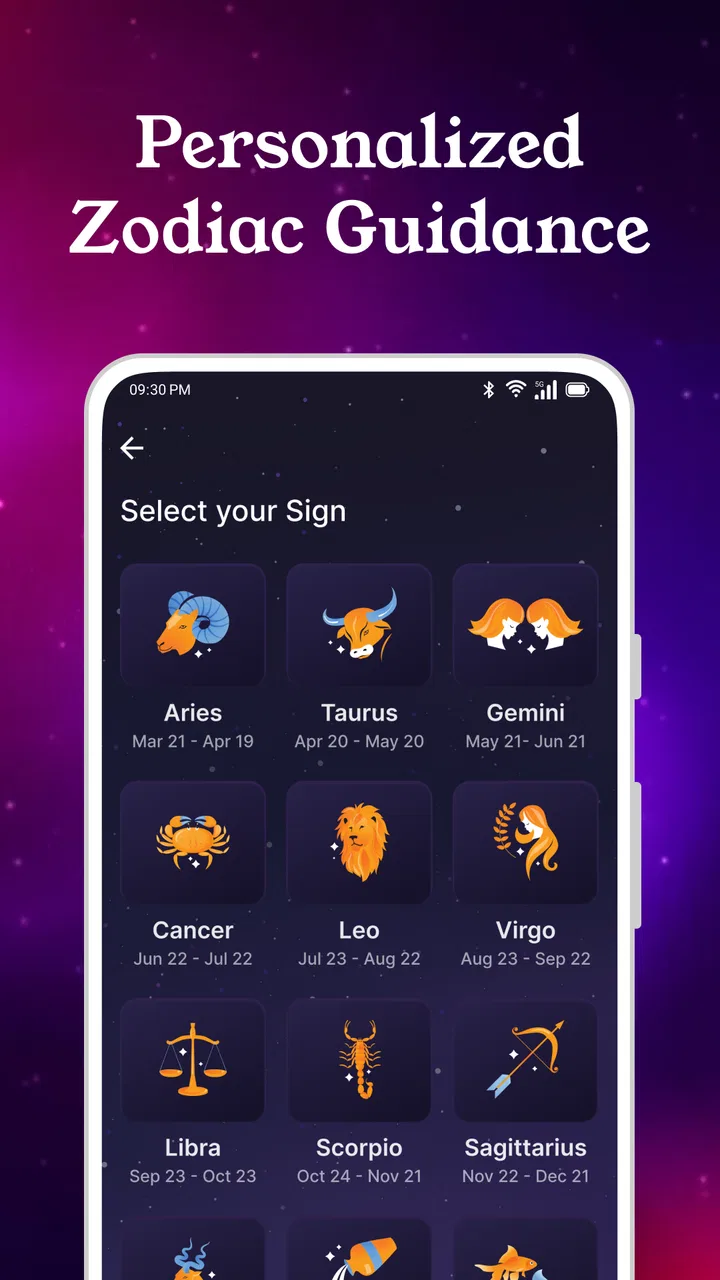
The simple subject matter also helps with orientation. Zodiac signs are recognizable categories, and a daily prediction is easier to understand than a dashboard filled with technical labels. Someone who is new to astrology can approach the app casually, while a regular reader can use it as a quick check-in without having to interpret a full birth chart.
There is an important trade-off here. A compact launcher experience may be easier to navigate than a large astrology platform, but it can also feel limited to readers who want detailed explanations, compatibility tools, moon phases, or a complete natal-chart workflow. I would not choose this as my only astrology app if I wanted to compare several systems or study the reasoning behind a prediction. Its strength is the short daily interaction.
Text, attention, and sensory comfort
Daily horoscope content is usually read rather than listened to or watched, so the visual presentation carries most of the experience. For me, the ideal use is a calm glance at the screen, not a long session. That makes the app potentially comfortable for people who prefer short pieces of information and dislike crowded lifestyle platforms that combine articles, videos, shopping, social feeds, and notifications in one place.
At the same time, I would avoid assuming that a clean concept guarantees comfortable reading for everyone. People with low vision, light sensitivity, dyslexia, or visual fatigue may need to adjust the phone’s own display settings, text size, contrast, or screen reader behavior. The practical question is not only whether the words are present, but whether the interface remains understandable after those system adjustments. Anyone who depends heavily on enlarged text should test the app early rather than committing to it as a daily tool.
For users who are sensitive to visual stimulation, the launcher format may be preferable to an astrology service packed with animated cards and promotional panels. A focused home-screen entry can reduce the amount of searching and scrolling involved. However, if the launcher itself becomes visually distracting or takes attention away from the task of reading, the convenience can work against the user. I recommend keeping the setup restrained and treating the shortcut as an aid, not as something that must dominate the phone.
People who rely on spoken feedback should also judge the app by the clarity of its labels and reading order on their own device. A useful test is to open the prediction with the phone’s accessibility service active and move through it without looking at the screen. If the sign, controls, and horoscope text are announced in a sensible sequence, the experience may be workable. If navigation jumps around, the app may be less suitable even though the content itself is simple.
Motor effort and the value of fewer steps
The launcher idea has a practical advantage for users who find repeated tapping tiring or difficult. Reducing the need to search, type, and move through several pages can make a daily check more manageable. This is especially relevant for someone with limited dexterity, tremors, joint pain, or a situation where one-handed use is necessary. A routine that takes only a few deliberate actions is easier to repeat than one that requires precise interaction with a busy website.
My advice is to evaluate the complete path, not just the first tap. A shortcut may make opening the app easier, but the reading experience still depends on how clearly the sign is selected, how controls are positioned, and whether accidental touches are easy to recover from. Users with motor limitations should spend a few minutes trying the app in the hand they normally use, rather than judging it from a quick installation.
There is also a useful everyday scenario here. Imagine checking the horoscope while standing on a train, holding a bag, or waiting in a clinic. A launcher-based route can be more convenient than opening a browser, dismissing unrelated tabs, and searching for the right page. The benefit is not that the prediction becomes deeper; it is that the path to it is less disruptive when attention and hand movement are limited.
For someone who wants a completely hands-free experience, however, I would be more cautious. The app is designed around phone access and daily reading, not around a clearly established voice-first workflow. If spoken commands are essential, a service that integrates more directly with the phone’s assistant or offers dedicated audio presentation may be a better choice.
Situational access beyond the home
The app makes the most sense in short, ordinary moments: before work, during a lunch break, while waiting for an appointment, or at night when I want a brief reflective ritual. Because the content is compact in concept, it does not demand the uninterrupted attention of a long article or a full astrology consultation. That makes it suitable for people who want a small pause rather than a major commitment.
It can also work for households where several people have different levels of interest in astrology. One person may read a sign every morning, while another may only open the app occasionally. The low barrier to entry means the occasional user does not need to learn a large set of features before finding the basic reading.
Still, context changes how useful the launcher feels. On a phone already crowded with reminders, work tools, and communication apps, another home-screen element may increase visual clutter. Someone who prefers a minimalist setup may find that opening a normal horoscope app once a day is actually less distracting. In that case, the launcher advantage is not universal; it depends on whether visibility helps or interrupts the person.
Privacy-conscious users may also prefer to keep astrology browsing inside a regular app rather than placing it prominently on the home screen. I am not treating the launcher as inherently intrusive, but visibility is a personal choice. If other people frequently see the phone, a discreet app icon or browser bookmark may feel more comfortable than a prominent zodiac-related entry point.
What it does better than familiar alternatives
Compared with searching the web each morning, Daily Horoscope Launcher offers a more consistent route. A search engine can return a mixture of sites, pop-ups, long pages, and changing layouts. That variety is useful when I want to compare interpretations, but it is inefficient when I only want one quick prediction. The launcher concept is better for repetition and predictability.
Compared with a full astrology platform, this app is easier to approach because it does not ask me to turn a casual interest into a detailed hobby. A comprehensive alternative is preferable for birth charts, planetary positions, relationship comparisons, or educational material. Daily Horoscope Launcher is the better fit when the question is simply, “What is today’s horoscope for my sign?”
Compared with reading a horoscope through a social network, the app can offer a more focused environment. Social feeds mix personal updates, advertisements, arguments, and recommendations with the content I originally wanted. A dedicated lifestyle app may be calmer for someone who wants to avoid that stream. The trade-off is that a social network may provide community discussion, while this app is not the place I would choose for conversation or shared interpretation.
One non-obvious advantage is consistency of intention. When I use a general astrology website, I am often tempted to keep browsing long after reading the prediction. A launcher-oriented tool can support a boundary: open, read, reflect, close. That makes it a reasonable choice for users who enjoy astrology but do not want another endless-scroll habit.
Where the experience may still create barriers
The biggest limitation is that convenience should not be confused with complete accessibility. A quick route to content does not tell me whether every control is easy to operate, whether text scales comfortably, or whether assistive technologies interpret the screen well. Those details vary by device, system settings, and personal needs. Anyone with specific access requirements should test the actual installation rather than relying on the app’s broad Everyone rating.
The Android requirement can also become a barrier. Phones running an older system may not be able to use the app, even if they are physically capable of displaying a daily horoscope. This matters for users who rely on older devices because they have familiar buttons, a trusted setup, or a larger screen than newer models. In that situation, a browser-based alternative could be more practical.
Another limitation is the narrow purpose. The app may be easy to understand precisely because it does not try to be an all-in-one astrology reference. But a user who expects personalized analysis, extensive background information, or many ways to filter and compare content may find the experience too light. I would skip it if my interest is analytical rather than habitual.
I would also be careful about treating daily predictions as factual guidance for serious choices. I can enjoy them as entertainment, reflection, or a prompt to think about my mood, but I would not use a horoscope to replace medical, financial, legal, or relationship advice. That is not a flaw unique to this app; it is the sensible boundary for this entire category.
Small workflows that make it more useful
My preferred workflow is to read the prediction at a fixed time, then put the phone away instead of repeatedly checking for new material. This turns the app into a brief ritual and prevents the launcher from becoming another reason to look at the screen. If the prediction suggests a theme such as patience or communication, I treat it as a personal prompt and judge the day by my actions, not by whether the text “comes true.”
A second useful approach is to compare the app with your own expectations for a week or two without changing your decisions because of it. That helps clarify whether you enjoy the reflective aspect or whether you are looking for more detailed astrology. If you mainly want a quick mood-setting moment, the launcher format may be enough. If you keep searching for explanations elsewhere, a full astrology service will probably serve you better.
For accessibility, I would set up the phone before evaluating the app: enlarge text if needed, activate the preferred contrast or display mode, and test spoken navigation. Then I would check the app in both portrait and the position I normally use. This is a more reliable method than assuming that an Everyone label covers every visual, motor, hearing, or cognitive need.
For shared phones, I would keep the shortcut unobtrusive and avoid presenting it as a source of authority. That makes the app easier to use around people who are curious but not committed to astrology. It also respects users who enjoy the content privately rather than wanting it to define the appearance of their home screen.
My inclusive verdict
Daily Horoscope Launcher is a focused lifestyle app for people who want a low-effort daily zodiac check. I appreciate its direct idea: bring a familiar reading closer to the home screen and remove some of the friction associated with browser searches and oversized astrology platforms. The free price and Everyone age rating make it approachable, while the strong average rating and broad install base suggest that the basic concept resonates with many users.
Its accessibility story is best described as promising in concept but personal in practice. Fewer steps can help people with limited dexterity, reduced attention, or a preference for predictable routines. A focused daily reading can also be less overwhelming than a crowded astrology service. But users who need reliable screen-reader behavior, extensive text customization, hands-free control, or support for older devices should test carefully and keep an alternative available.
The app is at its best when astrology is a small, repeatable moment rather than a full research project. I would recommend it to a friend who wants quick daily predictions, dislikes browsing through cluttered websites, and is comfortable using a recent Android phone. I would point that friend toward a more comprehensive astrology app, a browser-based option, or a voice-friendly service if detailed charts, deep explanations, older hardware support, or hands-free access matter more than a convenient launcher.
Overall, I see it as a gentle entry point rather than a definitive astrology companion. Its value comes from making a simple habit easier to start and easier to keep contained. If that matches what you want, AtomApplications has made a sensible, approachable tool. If your needs extend beyond a brief daily horoscope, its simplicity may become the very reason you eventually look elsewhere.
FAQs for Daily Horoscope Launcher
01What features does Daily Horoscope Launcher offer?
Daily Horoscope Launcher provides users with personalized daily horoscopes, tailored to each astrological sign. Additionally, it includes features like tarot card readings, zodiac compatibility tests, and a mood tracker. The app also offers customizable widgets for quick access to daily insights right from your home screen.
02Is Daily Horoscope Launcher free to use?
The app is free to download and offers basic horoscope readings at no cost. However, it includes in-app purchases for premium features such as ad-free usage, detailed horoscope reports, and advanced astrological insights. Users can choose a subscription plan or make one-time purchases to enhance their experience.
03How accurate are the horoscope readings?
Horoscope readings in Daily Horoscope Launcher are crafted by experienced astrologers. While astrology is subjective and meant for entertainment and personal reflection, many users find the insights to be surprisingly relevant and helpful in daily decision-making. Accuracy can vary, and users are encouraged to interpret the readings as guidance rather than strict predictions.
04Does the app require an internet connection?
Daily Horoscope Launcher requires an internet connection to fetch the latest horoscope updates and additional features such as tarot card readings and compatibility tests. However, once the daily horoscope is updated, it can be accessed offline until the next update. This ensures you have access to your insights even without continuous connectivity.
05Is my personal information safe with Daily Horoscope Launcher?
The app prioritizes user privacy and employs encryption to protect personal information. It only requires minimal data, such as your birthdate and sign, to deliver personalized readings. Users have control over what information they share, and the app is compliant with data protection regulations to ensure a safe user experience.
Pros
- Customizes daily horoscope notifications.
- User-friendly interface with smooth navigation.
- Integrates seamlessly with other apps.
- Offers personalized astrological insights.
- Includes a variety of zodiac themes.
Cons
- Requires internet access for updates.
- Contains frequent in-app advertisements.
- Limited features available without subscription.
- May drain battery with constant updates.
- Notifications can be overly frequent.

Daily Horoscope Launcher
Gallery